# Installation Guide: Setting Up Drive-In Drive-Thru Pallet Racks in Your Warehouse
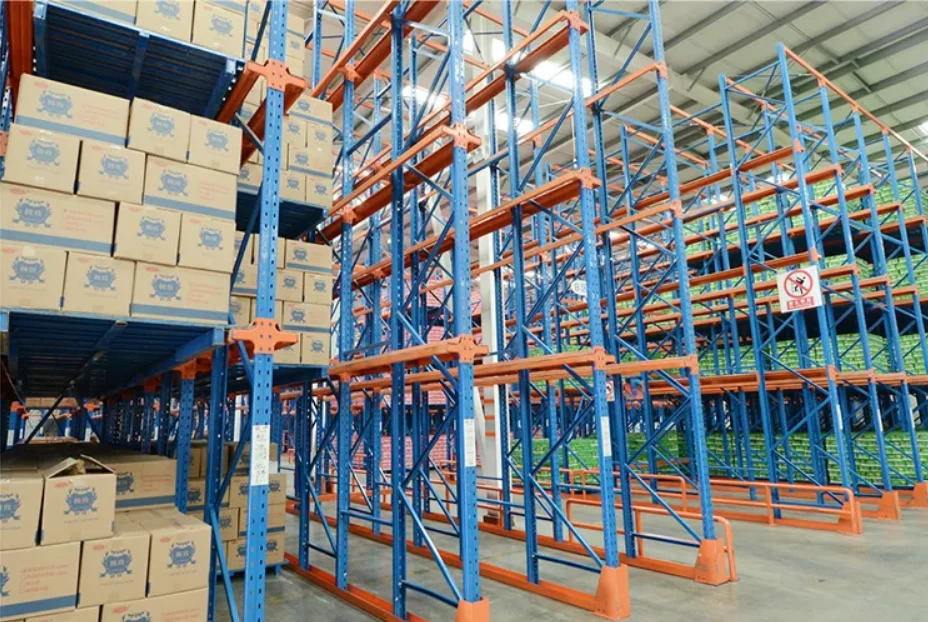
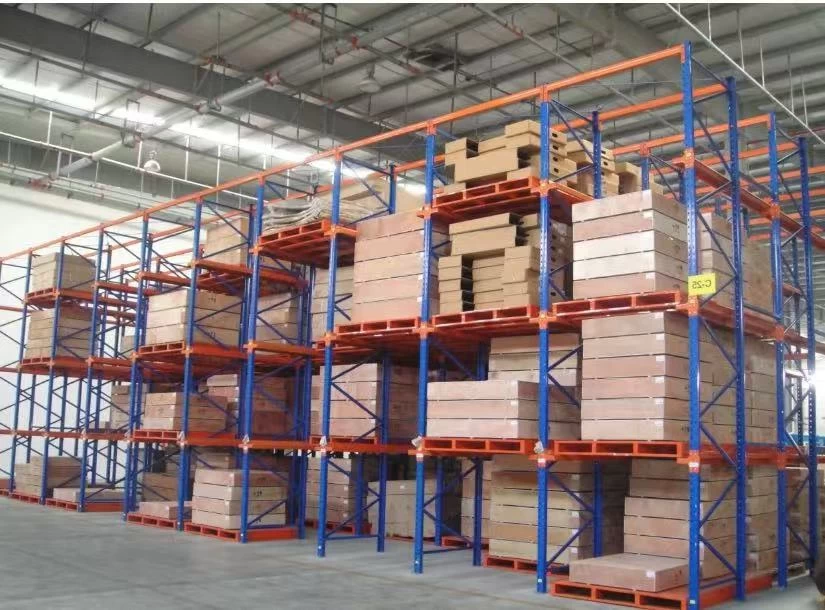
Efficient warehouse storage solutions are essential for optimizing space utilization, enhancing workflow, and improving inventory management. Among the various pallet racking systems available, **drive-in** and **drive-thru** pallet racks stand out for their ability to maximize storage density by allowing forklifts to enter the rack structure itself. However, setting up these systems requires careful planning and precise installation to ensure safety, durability, and operational efficiency.
This comprehensive installation guide will walk you through the process of setting up drive-in and drive-thru pallet racks in your warehouse, covering everything from initial design considerations to step-by-step assembly instructions and best practices for maintenance.
---
## Understanding Drive-In and Drive-Thru Pallet Racks
Before diving into the installation process, it’s important to understand the fundamental differences between drive-in and drive-thru pallet rack systems:
- **Drive-In Pallet Racks**: These racks allow forklifts to enter the rack structure from one side only. Pallets are stored on rails inside the rack and are loaded and retrieved using a Last-In-First-Out (LIFO) approach.
- **Drive-Thru Pallet Racks**: Similar to drive-in racks but accessible from both ends, enabling forklifts to enter and exit from either side. This configuration supports First-In-First-Out (FIFO) inventory management.
Both systems are ideal for high-density storage of homogeneous products with low SKU variation, such as bulk goods or seasonal items.
---
## Step 1: Planning and Design Considerations
### 1.1 Assess Warehouse Dimensions and Layout
Accurate measurements of warehouse height, width, and floor space are critical. Consider ceiling height, column placement, and aisle width requirements that accommodate forklift operations safely.
### 1.2 Determine Rack Specifications
Factors such as pallet weight, size, fork type, and stacking method influence rack specification. Common pallet sizes (e.g., 48"x40") should be factored into beam length and rail spacing.
### 1.3 Choose Between Drive-In and Drive-Thru
Decide based on inventory turnover rates and access needs. Drive-in racks are suitable for slow-moving goods; drive-thru racks enhance accessibility for fast-moving inventory.
### 1.4 Regulatory Compliance and Safety Standards
Ensure compliance with OSHA and local safety regulations regarding load capacities, fire protection clearances, and aisle widths.
---
## Step 2: Preparing the Warehouse Floor
### 2.1 Floor Condition Assessment
A flat, level, and reinforced concrete floor is essential for the stability of pallet racks. Conduct a thorough inspection for cracks, uneven surfaces, or moisture issues.
### 2.2 Marking Rack Locations
Use tape measures, chalk lines, or laser guidelines to mark exact locations for uprights and beams. Precision here prevents misalignment during assembly.
### 2.3 Installing Anchor Bolts
Anchor bolts secure the rack uprights to the floor. Drill holes at marked points and install appropriate heavy-duty anchors rated for expected loads.
---
## Step 3: Unpacking and Inspecting Components
Upon delivery, unpack all components carefully and inspect for damage. Key parts include:
- Upright frames
- Horizontal beams
- Support rails
- Safety pins and clips
- Load rails and braces
Check for manufacturer specifications, hardware quantity, and any missing items before commencing installation.
---
## Step 4: Assembling the Uprights
### 4.1 Position Uprights on Anchor Points
Place the upright frames onto the anchor bolts ensuring they align with layout markings.
### 4.2 Secure Uprights
Fasten the uprights tightly using nuts and washers on anchor bolts. Use a torque wrench to apply specified torque for stability.
### 4.3 Attach Brace Components
Install diagonal and horizontal braces between uprights to enhance structural rigidity. Verify that all bolts are tightened securely.
---
## Step 5: Installing Load Rails and Support Beams
### 5.1 Mount Load Rails for Pallet Support
Attach load rails inside each bay where pallets will rest. These rails guide pallets into position and bear the load.
### 5.2 Assemble and Install Horizontal Beams
For drive-thru racks, connect horizontal beams spanning between uprights, creating a stable framework. Use locking pins/clips to secure beams.
### 5.3 Check Level and Plumb
Use levels and plumb bobs to ensure beams and uprights are perfectly vertical and horizontal, preventing uneven load distribution.
---
## Step 6: Installing Safety Features
### 6.1 Add Column Protectors and Guards
Install protective barriers around uprights to minimize forklift impact damage.
### 6.2 Install Backstops or End Stops
Backstops prevent pallets from being pushed through the rack inadvertently, especially important in drive-in configurations.
### 6.3 Label Load Capacities Clearly
Mark maximum load capacities visibly on racks to ensure safe loading practices.
---
## Step 7: Final Inspection and Testing
Conduct a thorough inspection to verify:
- All bolts and fasteners are tight
- Proper alignment of all components
- Presence and functionality of safety features
- Adequate aisle clearance for forklift operation
Perform test loading with a few pallets to confirm stability and ease of access.
---
## Best Practices for Maintenance and Operation
- **Routine Inspections**: Schedule regular checks for structural integrity, loose bolts, and signs of wear.
- **Forklift Operator Training**: Ensure operators are trained on maneuvering within narrow aisles and handling pallets safely.
- **Load Management**: Avoid exceeding rated capacities and maintain balanced loading to prevent rack deformation.
- **Cleanliness**: Keep aisles and rack surfaces free of debris and spills to reduce hazards.
---
## Integrating CSS and Design Elements in Warehouse Software Interfaces
While the installation pertains primarily to physical setup, modern warehouses increasingly rely on digital interfaces for inventory management. When designing software dashboards or intranet pages related to warehouse rack management, applying robust CSS techniques can enhance usability.
Key CSS properties useful in such applications include:
- **Box-sizing: border-box** — Ensures padding and borders are included within element widths, simplifying layout calculations.
- **Font-family: Arial, Helvetica, sans-serif** — Provides clean, readable typography for data-heavy dashboards.
- **Max-width and Margin: auto** — Centers containers responsively, improving visual hierarchy.
- **Box-shadow and linear-gradient** — Adds subtle depth and background effects for better user experience.
- **RGBA colors** — Enables transparency effects to layer UI elements without clutter.
Using these styles in web portals that monitor rack usage, stock levels, or safety inspections aids in delivering clear, professional, and functional user interfaces.
---
## Conclusion
Installing drive-in or drive-thru pallet racks in your warehouse is a strategic investment that maximizes storage density and improves material flow. By carefully planning the layout, securing proper foundations, assembling components accurately, and incorporating safety features, you can ensure a durable and efficient racking system.
Coupled with effective maintenance protocols and operator training, these pallet racks will serve as a backbone of your warehouse operations for years to come. Additionally, leveraging modern web design principles in your warehouse management software complements physical infrastructure by streamlining information flow and decision-making.
For businesses aiming to optimize their storage solutions, following this detailed installation guide will lay the groundwork for a safer, more organized, and productive warehouse environment.
---
*If you need assistance sourcing quality pallet racks or professional installation services, contact our team of warehouse storage experts who can tailor solutions to your specific operational needs.*